Handling Tracked Changes with Ease

You’ve received your manuscript back from your editor with markup. It’s time to review all the changes, and the task ahead feels daunting. Is there a way to speed things up a bit?

Setting your displays and creating keyboard shortcuts can make the task of accepting and rejecting changes a lot faster and easier.

  • 1. Set Word to “Show Only Comments and Formatting in Balloons.”

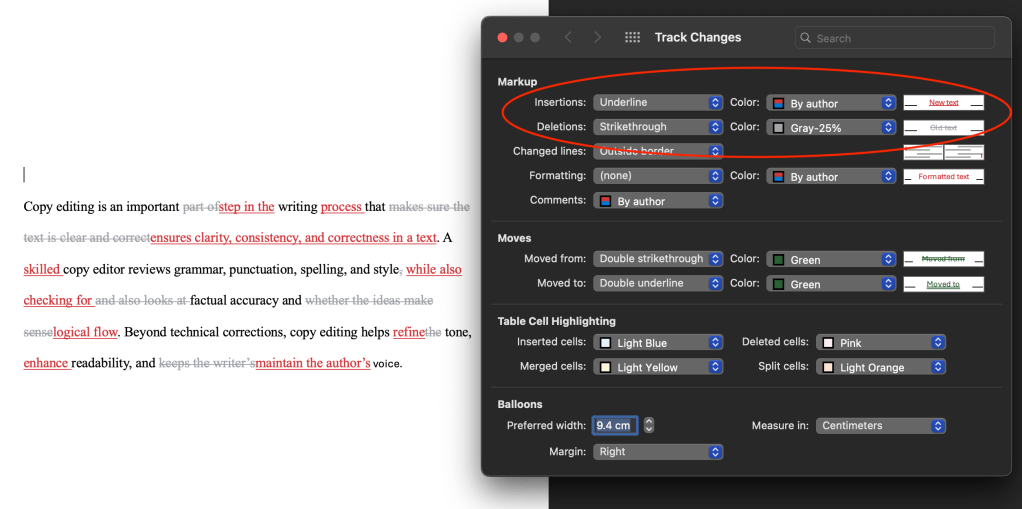
This means that additions and deletions will appear in the body of the text. It is much easier to apprehend changes when they appear in the body of the text rather than appearing offset as balloons.

  • 2. Set the colours of the markup so that additions visually advance (using a bright colour) and deletions visually recede (using a dull colour).

This reduces competing messages, and it is easier to grasp changes when your eye is drawn to what the text has changed to. Tracking > Markup Options > Preferences…

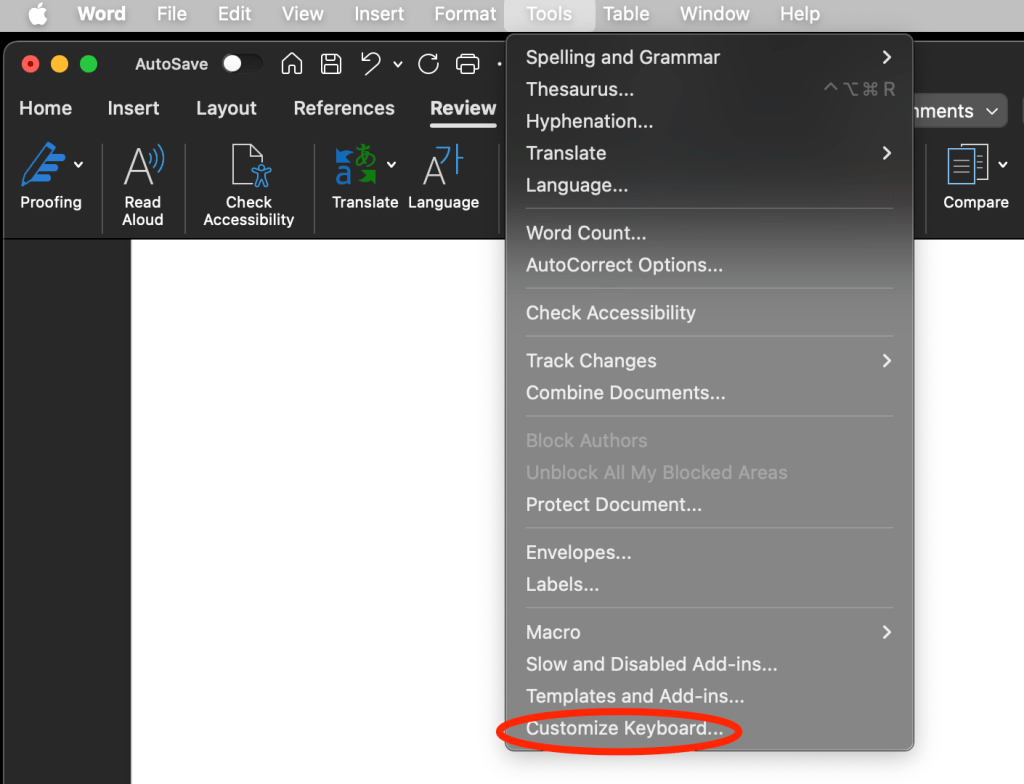
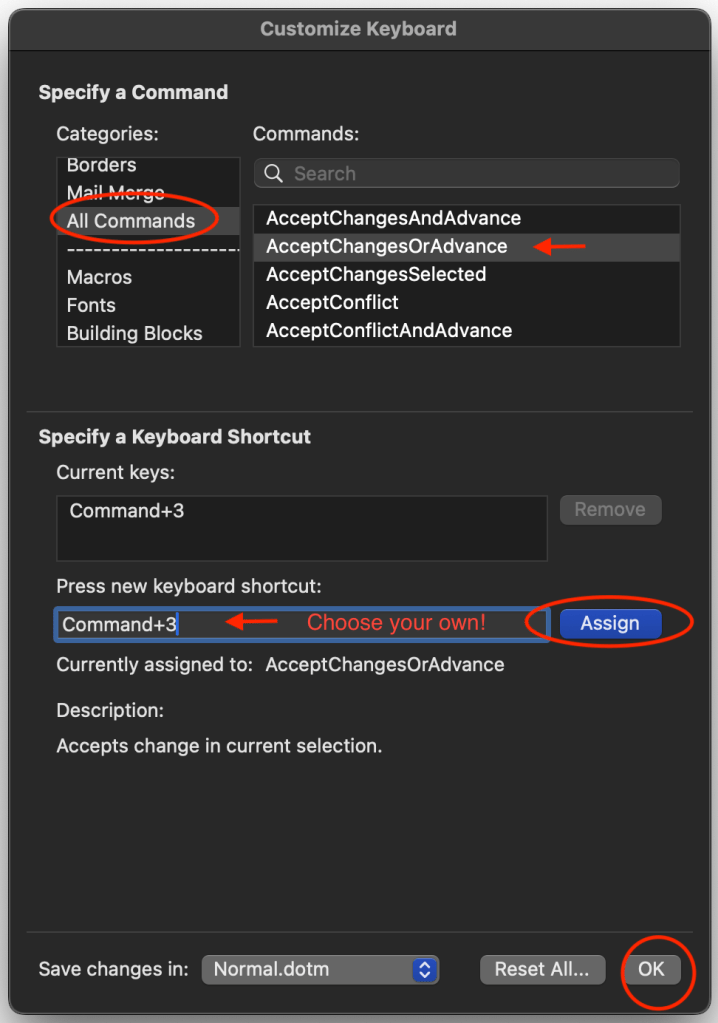
  • 1. Create a keyboard shortcut for โ€œAccept Change and Move to Next.โ€

This will save your hand from performing one million clicks. It also keeps your cursor on the page, making your reviewing process more efficient. Choose your own keyboard shortcut!

  • 2. Similarly, you can create a keyboard shortcut for โ€œReject Change and Move to Next.โ€

BONUS: If you want to accept large areas of changes all at once, you can assign a keyboard shortcut to “AcceptChangesSelected.”

I hope this helps make reviewing edits a little less of a headache!

Markup colour tip comes from Geoff Hart’s Effective Onscreen Editing: New Tools for an Old Profession.

Two Tips for Cleaning Up Your Manuscript

Once you know these, you canโ€™t unknow them, and you will see them in all kinds of published theses and dissertations (including my own, oops!). 

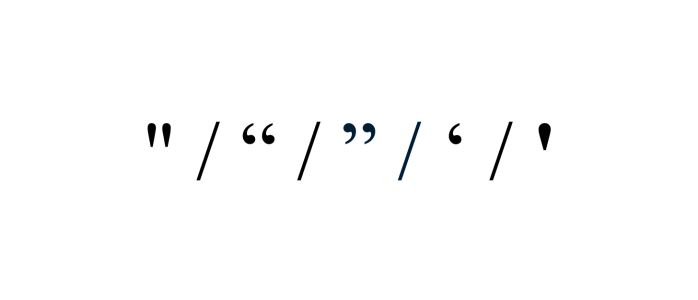
Straight quotes look the same whether they open or close a quotation and are a holdover from the typewriter. Smart quotes are the curly quotation marks that indicate the opening or closing of a quotation.

Often, when we cut and paste quotes from the web or other sources, we can unwittingly bring the local formatting into our documents, causing straight quotes to show up where they shouldn’t.

Fix: Find and Replace All

Word is set to automatically use smart quotes, so all you have to do is put a quotation mark into โ€œFindโ€ and a quotation mark into โ€œReplaceโ€ and select โ€œReplace All.โ€

Word will replace all the quotation marks with smart quotes whether they were originally straight or already smart.

You can do this with apostrophes as well. 

Can you spot the difference?

Commas following italicized titles, such as The Color Purple, should be consistent with the punctuation of the surrounding text (as it is here). 

It can be difficult to notice the difference between an italicized comma and a regular comma if you’re not looking for it, but now you’ll see this everywhere, and it will bug you. You’re welcome.

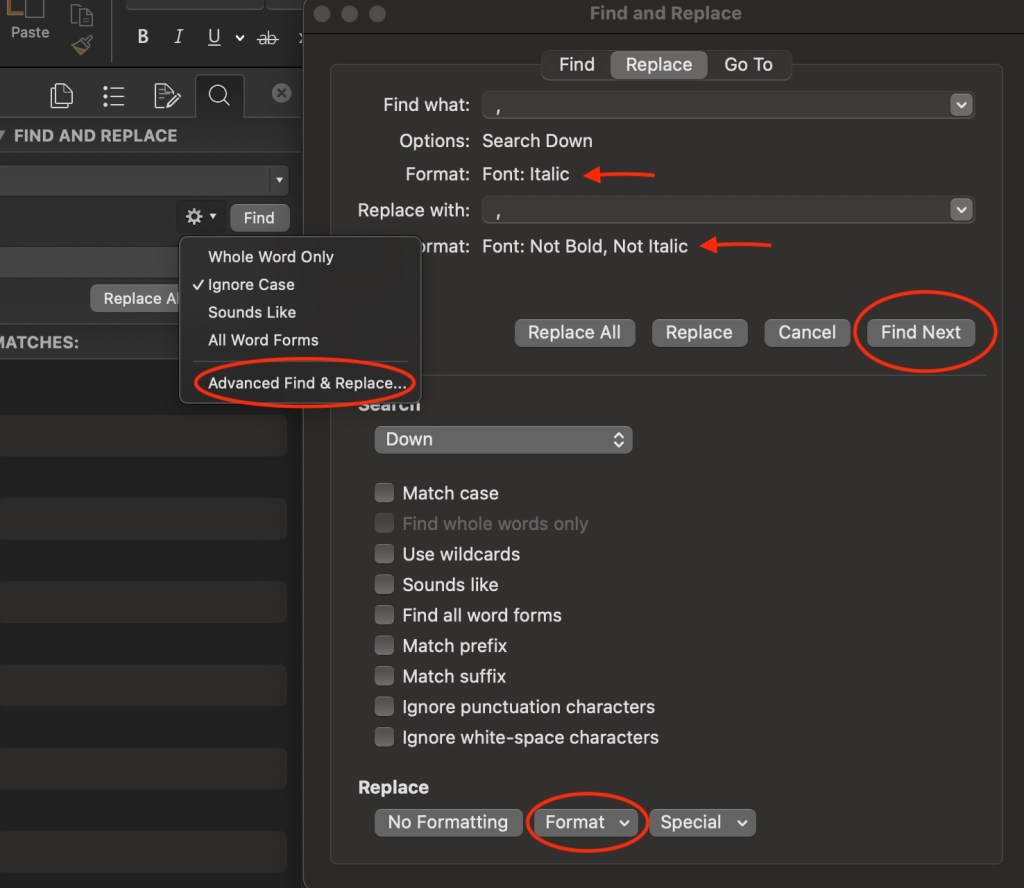
Fix: Advanced Find and Replace 

Under Advanced Find and Replace, type a comma in the โ€œFind whatโ€ field. 

Then use the dropdown and select Format > Font > Font Style > Italics

Under the “Replace” tab, type a comma in the โ€œReplace withโ€ field. 

Then select Format > Font > Font Style > Regular

You can’t use “Replace All” for this fix. Rather, you will have to decide whether or not to replace each instance individually, because there may be cases where the italicized comma should remain, such as when the comma appears within a title or italicized passage.

If you have any trouble executing these tips, please let me know here!

Early in the Dissertation Process? Here Are Some Process Tips

These tips are geared toward technical and planning aspects of the dissertation process that can make your life easier by the time you’re getting ready to submit.

These are things I wish I knewโ€”or did more consistentlyโ€”when I was in the process of writing my dissertation.   

  • Download previously published dissertations from your department. You can usually find them on the university library website, the graduate studies website, or a dedicated university research repository website.
  • Take a look at a few examples and look for things like, How are they formatted? Where do they insert their figures? Do the ones with epilogues look interesting or would a proper conclusion suit your work better? What are their abstracts like? Who do they thank in their acknowledgements
  • Itโ€™s never too early to look at your universityโ€™s thesis formatting guidelines. What are your options when it comes to fonts and sizing? How should block quotes be indented? Should they be single- or double-spaced?
  • It can be a headache to go through and convert all the formatting at the end of the writing process, so it’s helpful to keep formatting in mind as you write.
  • Along these lines, pay attention to what happens to your formatting when you cut and paste content from other files or sources; the formatting is often imported along with the content. Iโ€™ve seen cases where line spacing or paragraph indents had to be checked and fixed paragraph-by-paragraph throughout the entire dissertation because, of course, if your block quotes are formatted differently than the rest of the document, you can’t simply select-all and apply a change to the entire document.
  • If you have an eye to formatting as you go, youโ€™ll be smooth sailing at the finish line. 
  • Authors often use separate files to write their chapters. A benefit of using a single, long-form document is that you can more easily cut and paste and rearrange passages from one chapter to another. 
  • But it can be unwieldy to work with a long document if youโ€™re not taking advantage of Word’s navigation paneโ€”which allows you to create a clickable table of contents.
  • To learn how to create a long-form document that’s easy to navigate, click HERE
  • Make use of the “find” function to move around your document by searching keywords.
  • Fact: citations are frustrating. Reduce your pain by recording the full citation information of all your sources as you conduct your research, and by citing your sources as you write.
  • If you find yourself missing information from your citations, use google books, google scholar, or perplexity to find the missing parts. To find a page number, put a passage word-for-word in quotation marks into google.
  • When it comes to formatting your footnotes and bibliographic entries, the writing lab at Purdue University is an excellent resource.
  • When you’re researching in an archive, don’t forget to record the archive box and file numbers and titles. If you’re using your phone to take photos of archival items (with the archive’s permission of course), then also snap a photo of the file and the box information.
  • Use a scanning app on your phone to quickly create a PDFs.
  • And maintain a file naming convention for your PDF sources, as well as when youโ€™re versioning your work. Your future self will thank your present one!
  • Writing is like a muscle. Many find it productive to keep that muscle strong by writing somethingโ€”anythingโ€”every day.
  • Some write journal entries each day that may or may not have anything to do with their research, as per Joan Bolkerโ€™s wonderful advice.
  • Others keep a running file of their brainstorming. When I was writing my dissertation, I would often find myself sitting in front of my computer, thinking and thinking, trying to figure out what I wanted to say before I wrote it down. What I discovered was that it is much easier to figure out what I want to say when I free-write the thinking part. My free-writing might have sounded something like: “I donโ€™t think this is an argument. Ok so then what would make it an argument? What if I connect this bit with the section in chapter 2…how would that change things?”
  • Both techniques take away the pressure to produce usable writing, and in the process, often end up producing usable writing!

If you have questions or wish there were a blog post that illuminated some other aspect of dissertation preparation, please let me know!

Dashes: Keyboard Shortcuts

An em dash is about the length of the letter M (โ€”) , and an en dash is about the length of the letter N (โ€“). That is all you need to know. Just kidding, but this tidbit certainly helps me keep them straight!

An em dashโ€”one of my favourite forms of punctuationโ€”can replace a comma, a colon, or surround parenthetical information.ย 

Shortcuts:

On a Mac: Option + the minus sign

On a PC: Control + the minus sign

An en dash represents the idea of โ€œbetween ___ and ___.โ€

Example: The meeting will take place 9:00am โ€“ 11:00am.

Shortcuts:

On a Mac: Option + the minus sign

On a PC: Control + the minus sign

A hyphen is used in compound words (and, like the en dash, the hyphen can also represent a range, for example pages 4-9).

Example: book-length manuscript

But, use an en dash when a prefix applies to more than one word that follows it:

Example: postโ€“World War Two

For a succinct and helpful guide on how to use these punctuation marks in your writing, see https://www.merriam-webster.com/grammar/em-dash-en-dash-how-to-use


What Copy Editors Do and Don’t Do

As a copy editor who enjoys working on theses and dissertations, I often work with scholars hiring a copy editor for the first time. Sometimes they can feel unsure about what they’re getting into.

They might wonder, Will my writing be scrutinized and judged? Should I feel embarrassed about grammar mistakes or overlooked gaps in logic? Will the copy editor bulldoze over my writing style?

Such concerns make sense considering the nature of academic scholarship: writing in isolation on the one hand and sharing work under rigorous scrutiny on the other. Copy editing is a great way to help bridge this divide. I’d like to offer reassurance that a copy editor is there to support their clients, not to judge them or change their work.

Freelance copy editors provide a second pair of eyes on writing that may have been weeks, months, or years in the making. If you’ve read over the same sentence a hundred times, would you notice an extra “the” in there? And when you are steeped in the nuances of your ideas, can you always predict how your messages will land for someone coming to them for the first time? Copy editors bring that distance, and they can support you in delivering clean and clear writing to your readers.

A copy editorโ€™s job is to notice things, suggest changes, and help you say what you want to say.

  • Rewrite your work.
  • Make changes according to our personal preference or personal style.
  • Implement changes without your knowledge (all suggested changes are tracked).
  • Judge your writing.
  • Police grammar (a good editor will respect cultural, political, or creative decisions that veer from dominant language rules).
  • Criticize the writing or the writer.
  • Have the final say.
  • Guarantee a perfect manuscript (editors are human!).
  • Correct errors in grammar, spelling, and usage (e.g. comprised or composed?).
  • Suggest changes to wording or organization for the sake of clarity and flow.
  • Query the author when unsure about meaning or intent.
  • Preserve the authorโ€™s voice.
  • Check that formatting is consistent.
  • Use track changes for the author to accept or reject.
  • Follow a style guide (e.g. Chicago, APA, MLA).
  • Work with authors or publishers to meet specific needs.
  • Field questions (any questions!).

A freelance copy editor can:

  • Help you assess what type of editing would be most worthwhile to focus on.
  • Provide resources and tips so you can do certain things yourself, such as format your footnotes.
  • Work on a portion of your project thatโ€™s giving you grief.

Speaking more personally, I know how stressful and overwhelming the process of writing a dissertation can be, which is one of the reasons why I enjoy supporting graduate scholars in their academic journey. It is important to me to bring care and compassion to the editing process.

If you’re still unsure, please reach out to schedule a complementary phone call to chat about your needs!


Quotations: Improve Your Writing By Assuming Readers Skim Them

When writers include quotations without fully explaining their significance, the work of interpretation falls on the reader’s shoulders. Not only does this risk misinterpretation, but it’s also a lot to ask of the reader.

In the following example taken from Birkenstein and Graff’s book on academic writing They Say / I Say, the author neither elaborates on the quotation nor offers context for the quoted authorโ€™s expertise:

Deborah Tannen writes about academia. Academics believe โ€œthat intellectual inquiry is a metaphorical battle. Following from that is a second assumption that the best way to demonstrate intellectual prowess is to criticize, find fault, and attack.โ€ I agree with Tannen. Another point Tannen makes is that . . .1

Without signposts from the writer, the reader is left wondering, which part of the quote does the author agree with? Is the author and/or Tannen presenting these ideas as cornerstones of academia (โ€œAcademics believeโ€)? Or is the author and/or Tannen calling these ideas into question? As well, the reader may wonder who Tannen is and what stake she has in the discussion.

The change in writing style aloneโ€”from the main authorโ€™s to a quoted author’sโ€”requires readers to shift their concentration and attend to a new mood, attitude, and voice. That can take some effort to translate.

In fact, the work of interpreting quotes can be so tiring for readers that some will admit to outright skipping over quotes as they seek to rejoin the author’s main narrative. In her guide to scholarly writing Revise, Pamela Haag observes that block quotations in particular can โ€œhave an ironic effect on some readers. [A writer] may be block quoting because the material is so vital, yet its appearanceโ€ฆcan trigger a Pavlovian skim mode reaction in readers.โ€2 In other words, a writer’s intent to attribute special status to an idea by quoting it in full can sometimes be totally undermined by doing just that.ย 

I’m not advocating for doing away with block quotes here. What I’d like to suggest is that when a writer does enough to prepare the reader for what’s to come in the quote, then the reader will be equipped with the information, perspective, and confidence they need to smoothly and seamlessly engage with the quoted material.

In the following revision, again in Birkenstein and Graff, the author offers plenty of commentary, interpretation, and explanation to illuminate the quote:

Deborah Tannen, a prominent linguistics professor, complains that academia is too combative. Rather than really listening to others, Tannen insists, academics habitually try to prove one another wrong. As Tannen herself puts it, โ€œWe are all driven by our ideological assumption that intellectual inquiry is a metaphorical battle,โ€ that โ€œthe best way to demonstrate intellectual prowess is to criticize, find fault, and attack.โ€ In short, Tannen objects that academic communication tends to be a competition for supremacy in which loftier values like truth and consensus get lost. Tannenโ€™s observations ring true to me because I have often felt that the academic pieces I read for class are negative and focus on proving another theorist wrong rather than stating a truth . . .3

By including their own commentary before and after the quotation to guide the reader’s interpretation, the author has created what Birkenstein and Graff call a โ€œquote sandwich.โ€ 

To me, the โ€œbreadโ€ of the quote sandwich is crucial to the extent that I encourage writers to strategically assume that the reader will, in fact, skim quotes. I believe approaching quotes this way is a helpful exercise in strengthening the clarity of arguments and narrative purpose. The bologna is bologna. (Not really, but stay with me.)

Returning to the revised example, hereโ€™s how it would read if we assumed the reader skipped over the quote entirely:

Deborah Tannen, a prominent linguistics professor, complains that academia is too combative. Rather than really listening to others, Tannen insists, academics habitually try to prove one another wrong. As Tannen herself puts it, โ€œWe are all driven by our ideological assumption that intellectual inquiry is a metaphorical battle,โ€ that โ€œthe best way to demonstrate intellectual prowess is to criticize, find fault, and attack.โ€ In short, Tannen objects that academic communication tends to be a competition for supremacy in which loftier values like truth and consensus get lost. Tannenโ€™s observations ring true to me because I have often felt that the academic pieces I read for class are negative and focus on proving another theorist wrong rather than stating a truth . . .

While the reader will certainly miss out on nuance, they will still be able to follow along with the authorโ€™s thought process. And when the reader is fully on board with the author’s thought process, they are better equipped to engage with the quoted material in an informed way. I would argue that when they encounter the quote, they will feel qualified for the task, and better take in the quote’s significance.

Carefully considering the “bread” of the quote sandwich will not only foreground your voice and strengthen narrative flow, but also improve the likelihood that readers will read the quote. Win, win!

Introducing quotes:

  • As X themself puts it,
  • X agrees when they write,
  • In their book Y, X writes,
  • While writing about Y, X contends,
  • X explains it this way:

Explaining quotes:

  • In other words,
  • In short,
  • Essentially, X is arguing that
  • X’s point is that
  • What matters to me here is

Adapted from Cathy Birkenstein and Gerald Graff, They Say / I Say: The Moves That Matter in Academic Writing.4

Endnotes:

  1. Cathy Birkenstein and Gerald Graff, They Say / I Say: The Moves That Matter in Academic Writing, Fourth Edition (New York and London: W. W. Norton and Company Press, 2018), 46. 
  2. Pamela Haag, Revise (New Haven and London: Yale University Press, 2021), 147, Kindle Edition. 
  3. Birkenstein and Graff, They Say / I Say, 48-9. 
  4. Birkenstein and Graff, 47-8.

Chicago’s Update on Ibid

In short, ibid is no more!

Have you ever moved a sentence from one place to another in your manuscript only to realize that doing so had reordered your footnotes and resulted in an ibid following the incorrect citation? And then you had to go back and figure out which citation the ibid originally followed? Headaches!!

This is why Iโ€™m so happy that in its 17th Edition of the Chicago Manual of Style (CMOS), Chicago recommends doing away with ibid.

Chicago cites that in electronic formats that link to single footnotes, ibid can confuse the reader .ย 

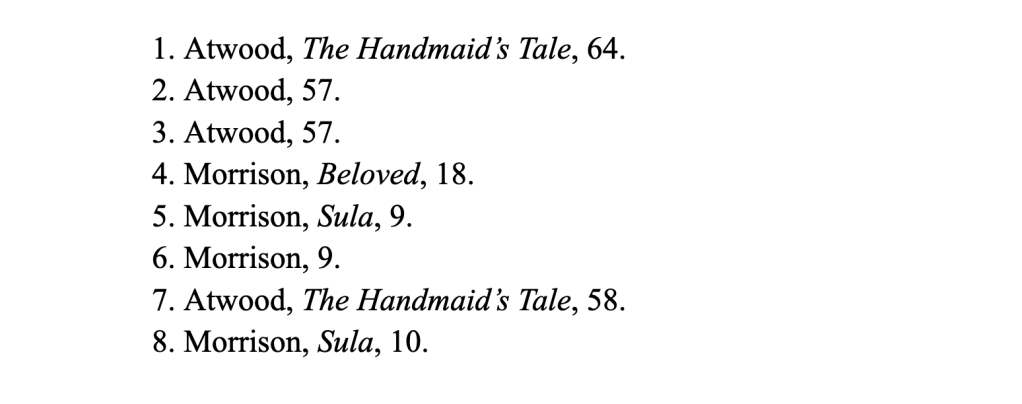
Notice that in entries that cite the last item cited, the entry is further abbreviated; the title is not included (no. 1โ€“3). The page number, however, is always included, even if the page number is the same (no. 2โ€“3).

Also notice that when an entry reappears later in the notes, the fuller version of the shortened entry is used (no. 5 and 8).

No longer is it required to include the full citation in the first entry in your footnotes, as long as you have a bibliography. 

So when your manuscript has a bibliography, you can use shortened notes exclusively. Yay!

It can be helpful for the reader, however, to have the full citation at their fingertips, which is why many publishers continue to use full citations in their first instance. But it’s nice to have options.

Who to Thank in Your Acknowledgements

The order of who you thank in your acknowledgements generally begins with the most formal or academic relationships (advisors) and ends with the least formal (family and friends).

If youโ€™re debating the inclusion of someone on account of a strained relationship, err on the side of including them. Especially if this is your supervisor! Relationships change, and omissions can be glaring.

If youโ€™re debating the inclusion of someone because youโ€™re unsure their contribution was significant enough, if they provided you with specific information, consider including them in a footnote instead.

As always, check your university guidelines. You can also download sample dissertations from your department.

This list is meant to jog your memory so you don’t miss someone you may have liked to thank. It’s not prescriptive.

  • Supervisors
  • Committee members
  • Colleagues
  • Those who may have helped you with your application to the program
  • Archivists
  • Librarians
  • Technicians
  • Administrators (perhaps someone facilitating your research ethics application was exceptionally helpful)
  • Institutions
  • Research participants
  • Copy editors
  • Proofreaders 
  • Funding bodies
  • Those who may have helped you write funding applications
  • Friends and family
  • Guidance
  • Support
  • Expertise
  • Indebted
  • Gratitude
  • Grateful
  • Acknowledge 
  • Collaborated with
  • Further thanks
  • Great pleasure
  • Enabled me
  • Accomplishment
  • I extend my gratitude to
  • Knowledge
  • Feedback
  • I would like to express
  • My sincere thanks
  • Special thanks
  • Significant contributions
  • My sincere appreciation
  • Tireless
  • Recognize
  • Assistance
  • Insights
  • Invaluable advice
  • Treasured
  • Cherished
  • Instrumental
  • Unwavering
  • Challenged me

Let me know if you end up thanking someone I haven’t listed here that you think others may wish to thank as well!

Restarting Footnotes in a New Chapter in Word

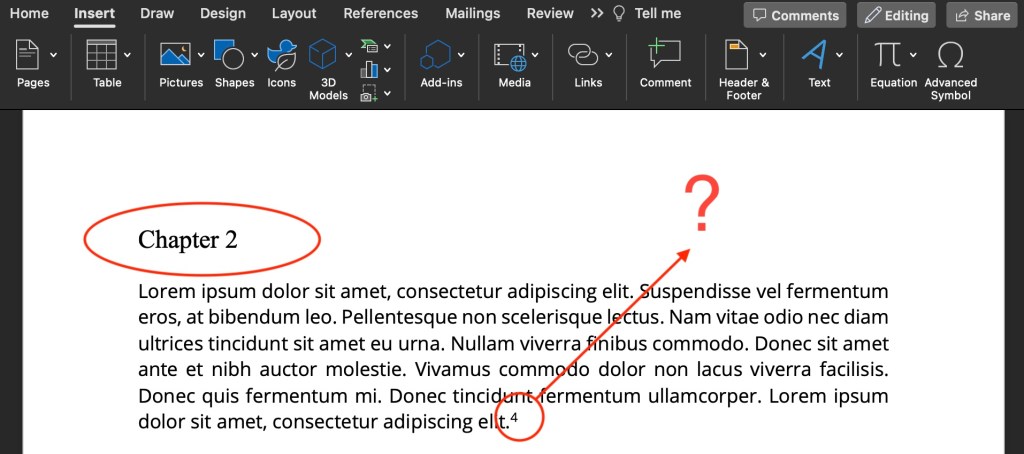
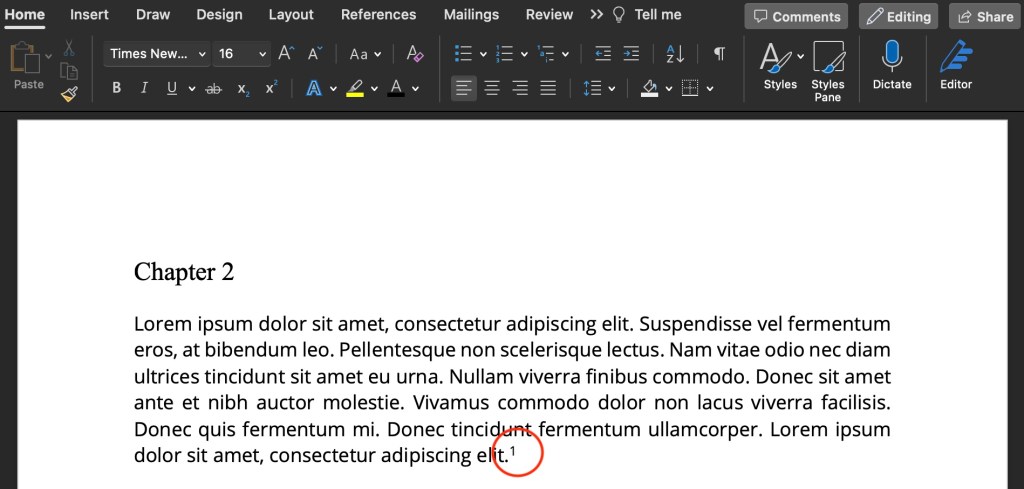
Chapter 3 should not start with footnote 38!

Footnotes should begin at 1 in each new chapter. Without section breaks, your footnotes will continuously count upward across the entire document.

How do you get footnotes to restart in a new chapter?

  • Put your cursor at the start of the chapter
  • In the Menu Bar, click Insert > Break > Section Break (Continuous)

Nothing will happen yet, but know that there is an invisible section break there. Repeat these steps for all chapters.

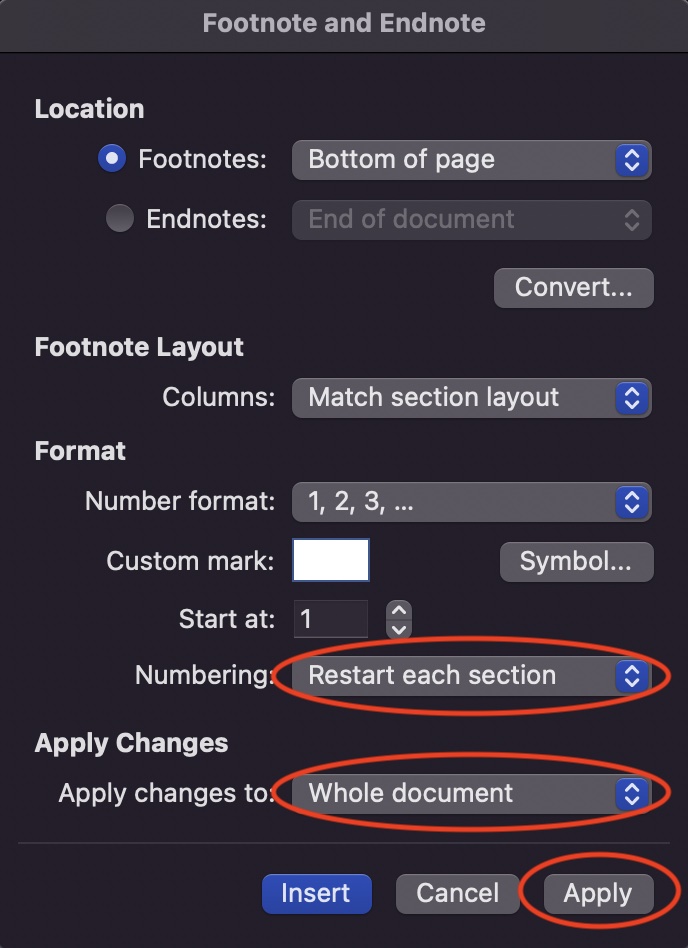
Next, set the footnotes formatting:

  • Click Insert > Footnote (don’t worry, you’re not actually going to insert a footnote)
  • Under Numbering, select Restart each section
  • Under Apply changes to, select Whole document
  • Click Apply

That’s it!


How to Change Headings Styles in Word to Beautify Your Chapter Titles

As dazzling as Word’s default headings styles may be, you may wish to choose something other than Calibri font in blue for your chapter titles and subheadings.

You can change these manually by highlighting the chapter title or subheading and using your usual font tools on your home tab.ย Or…

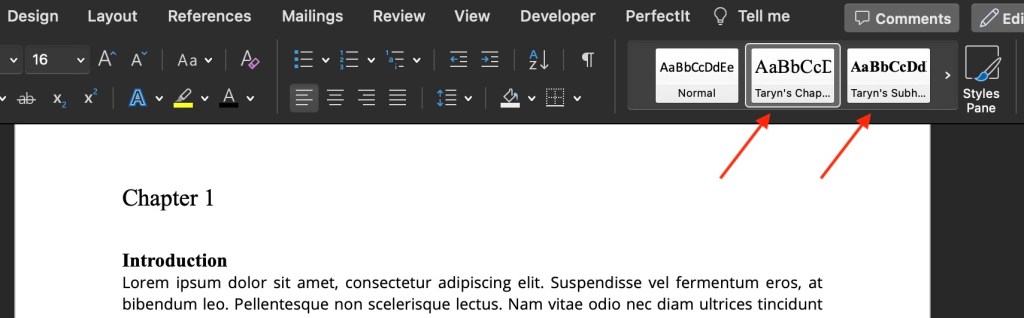
You can create your own heading buttons with your choice of styles/format to use throughout your document.

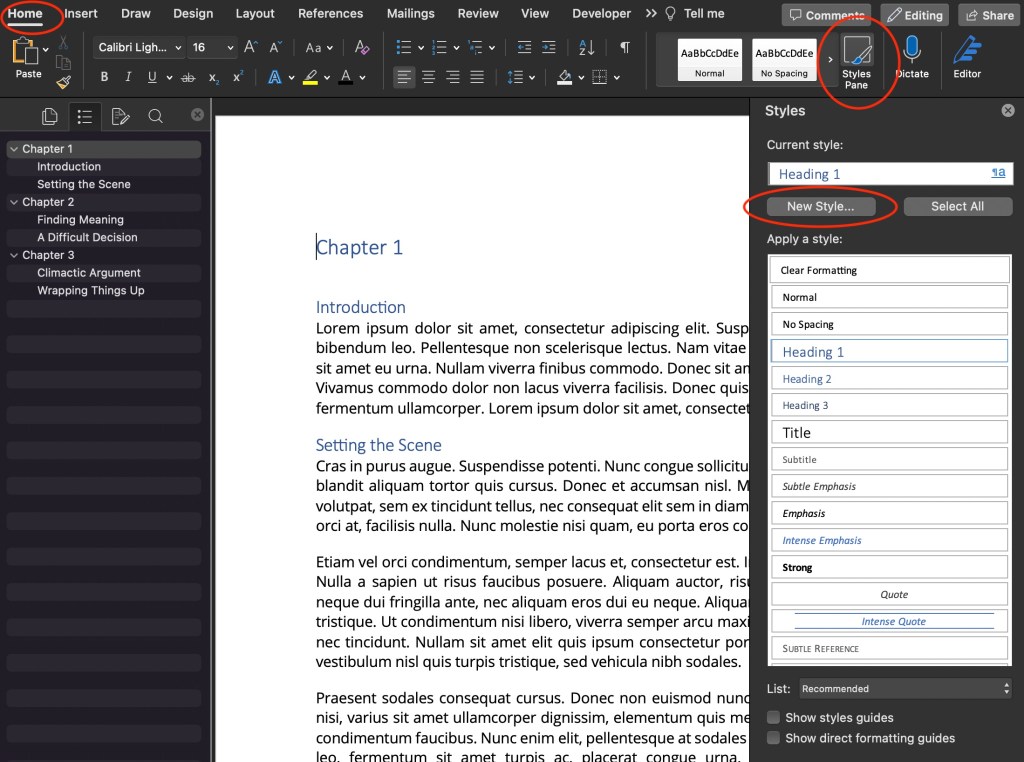
  • Under theย Homeย tab in your Main Menu, clickย Styles Pane
  • Highlight or set your curser on a heading in your document (I chose Chapter 1)
  • Click New Style
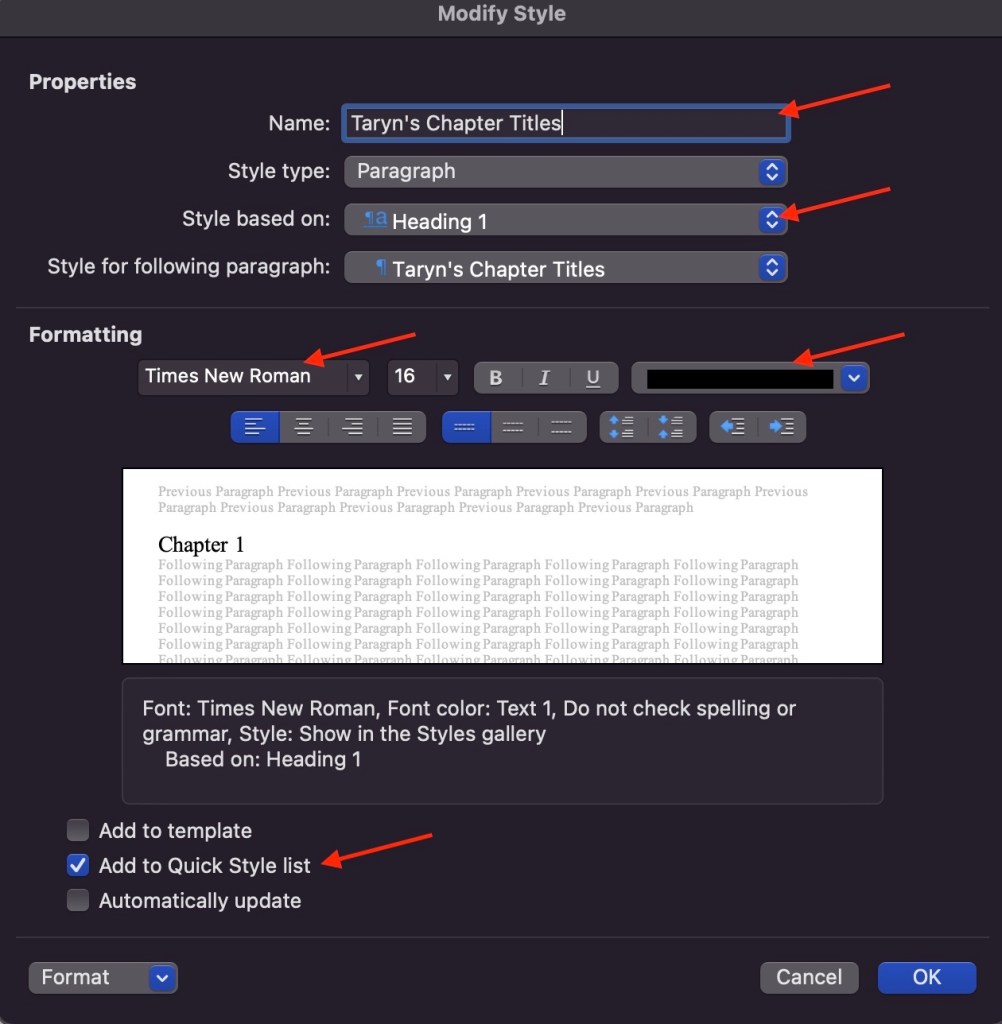
  • Write in a name for your style (I chose “Taryn’s Chapter Titlesโ€)
  • Leave the โ€œStyle based onโ€ setting at Heading 1
  • Choose your font, font size, font styles, and font colour
  • Select the checkbox for “Add to Quick Style list”
  • Clickย OK

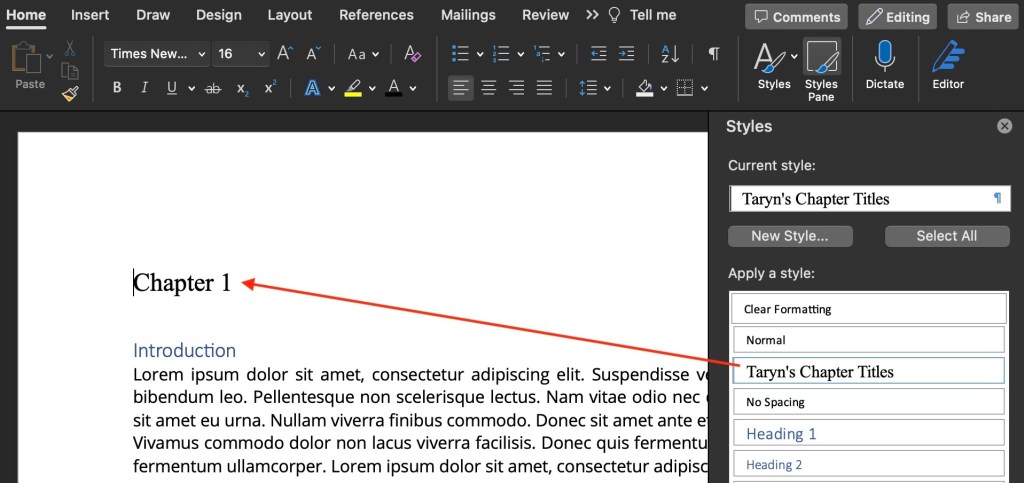
Here’s what my chapter heading looks like now:

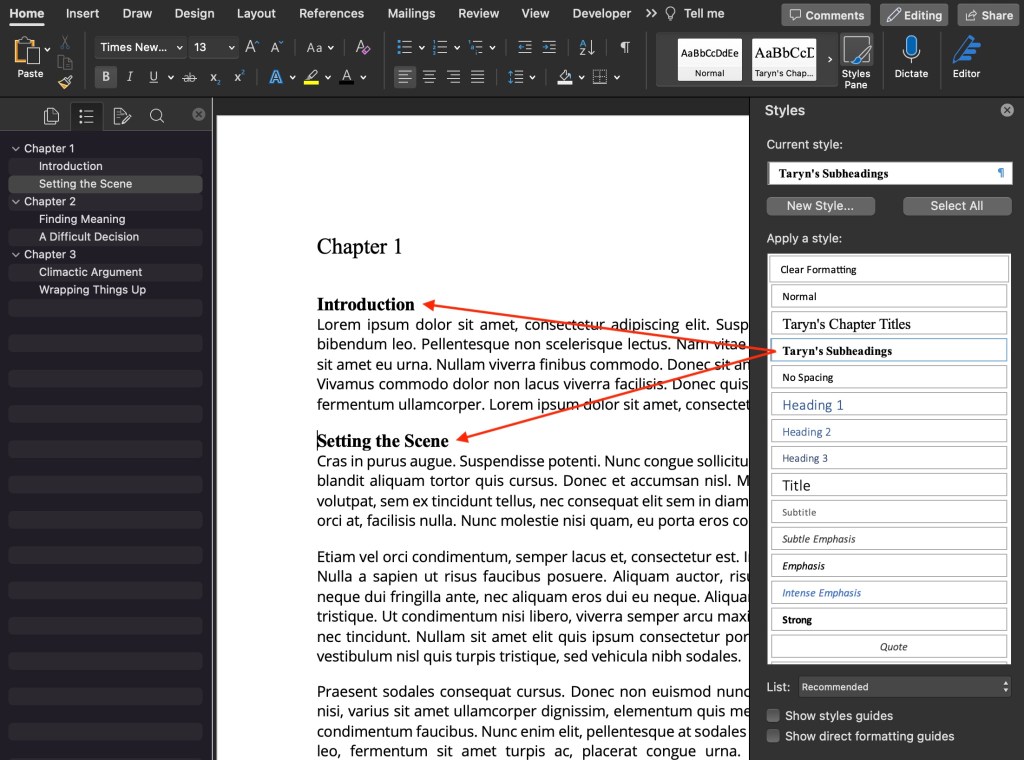
  • Repeat the steps above to change the format of your subheadings
  • Change โ€œStyle based onโ€ to Heading 2
  • Clickย OK

Now you can access your custom styles in the Quick Styles list under the Home tab in your Main Menu:

Beauteous!